Updating Payment Settings
2 minutes to readYou can easily edit your account’s payment settings in Caspio.
- From the Caspio main menu bar, click the Account icon
 → Plan and billing.
 - Select the Payment settings tab.
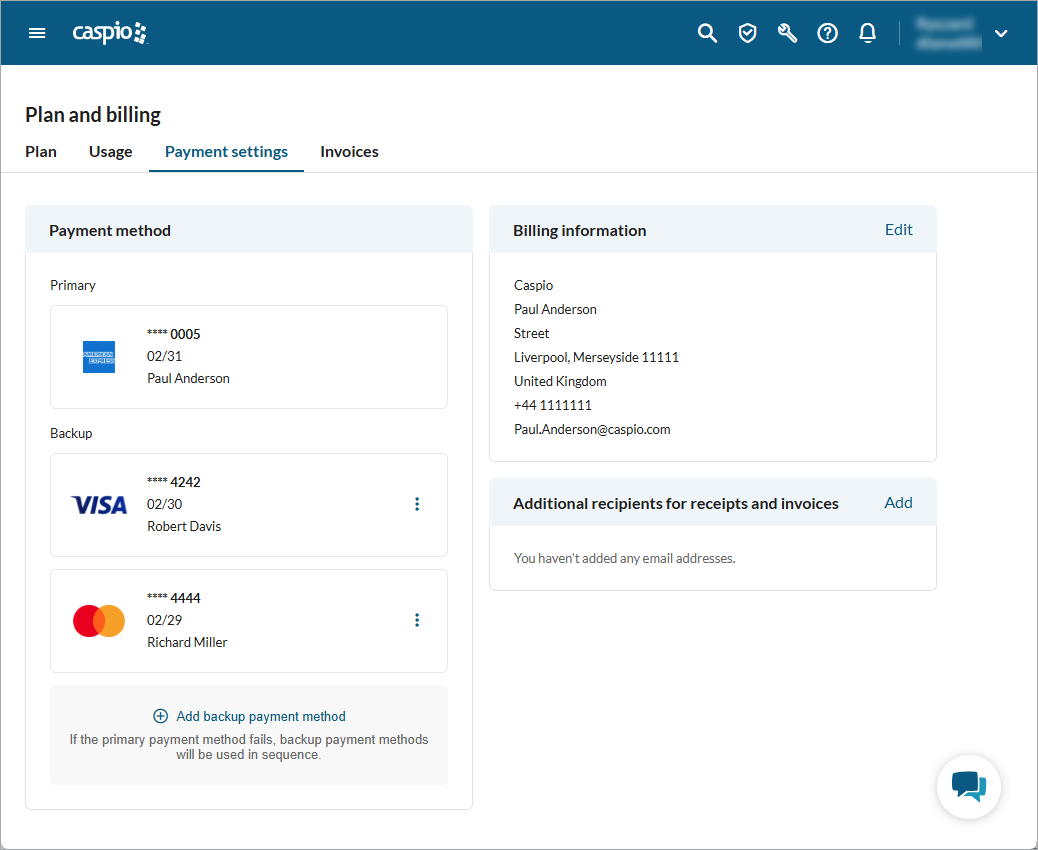
- To add a primary payment method, in the Payment method section, click Add. In the right panel that opens, enter the details of your credit card and click Save.
Your bank may require 3-D Secure verification. - Optional: To add backup payment methods, at the bottom of the Payment method section, click Add backup payment method. In the right panel that opens, enter the details of your credit card and click Save.
If the primary method fails to process a recurring payment, backup methods will be used in sequence. You can add up to four backup payment methods. - To update the billing information, in the Billing information section, click Edit. Provide your billing information and click Save.
- Optional: If you need additional recipients of billing emails, in the Additional recipients for receipts and invoices section, click Add. Enter the email address of an additional recipient and click Add.
Your payment methods are now updated. If any of your credit cards are set to expire within the next month, we will notify you by email and through your account notifications.
Note: You cannot edit credit cards after adding. If you want to update card details, for example because of expiration, just delete the outdated card and add a new one.

