

Parameters are a great way to customize your Caspio apps. A parameter consists of a name surrounded by “[@” and “]”. Parameters are replaced dynamically with other values when your DataPage loads. For example, you can replace [@First_Name] with "Fred" (whenever Fred is the current user).
Values can be passed to parameters from:
- Your source table or view (including the authentication table)
- Another DataPage
- A URL query string
There are many ways you can use parameters to customize your DataPages. Learn more about Parameter Types.
Use Parameters Internally
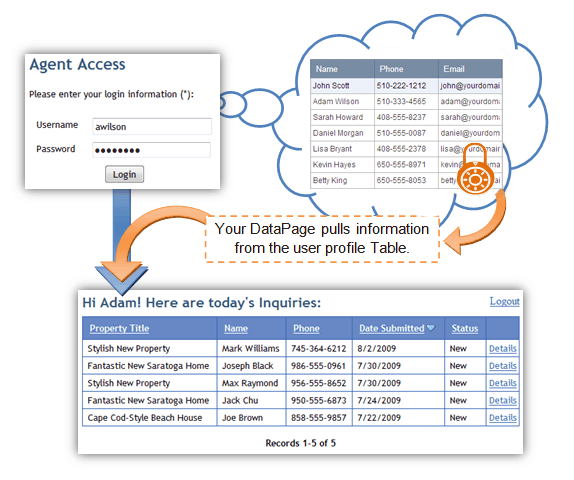
You can use parameters within your DataPages to access data in your tables. For example, you can access authentication table data to make customized messages for your end user.
Pass Parameters Externally
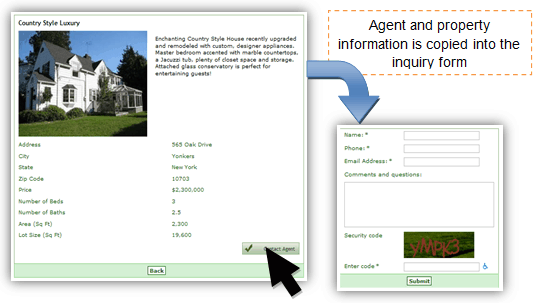
You can pass parameters from one DataPage to another. This eliminates the need to re-enter the same data and allows you to create multipage web forms.
Read more topics to understand how Parameters work:
- Parameters
- Parameter Types
- System Parameters
- Passing Parameters through Caspio
- Displaying Parameters
- Parameters as Query String Values
- Receiving Parameters
- Resetting Parameters
- Passing Multiple Values in One Parameter
- Formatting Parameters in Email Body and HTML Blocks
- Parameters in Dropdowns, Listboxes and Radio Buttons
- Custom Filter Elements
